
Reservations in one place
Receive bookings through your restaurant’s booking page and add reservations taken by phone, message or in person. Record the source while keeping each reservation in the booking list.
Manage bookings, table availability, waiting guests and guest details during a busy service. Your 30-day trial begins after company and ownership approval.
No card required.
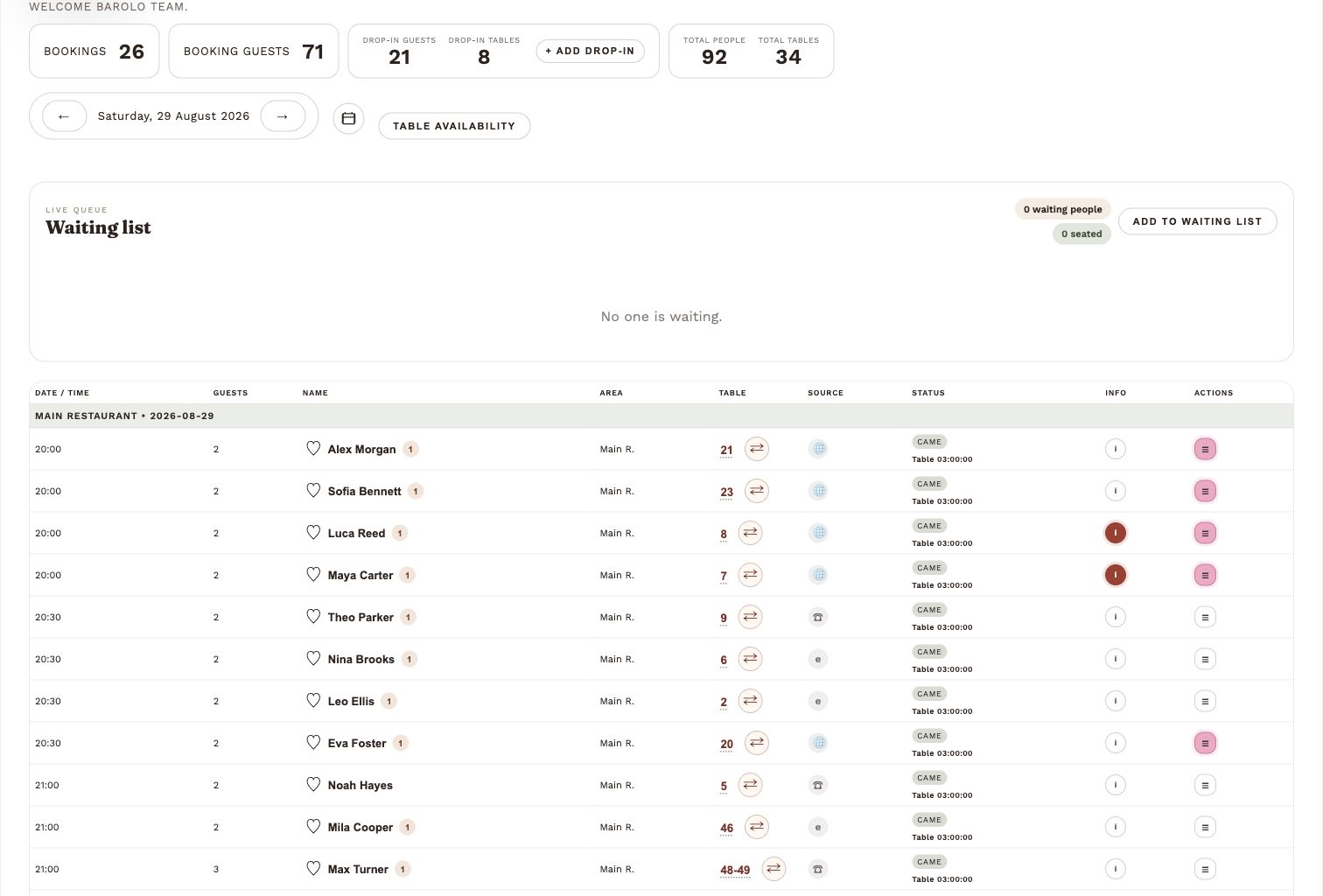
When the room is busy, your team needs clear information: who is coming, which tables are available and who is waiting to be seated.
Receive bookings through your restaurant’s booking page and add reservations taken by phone, message or in person. Record the source while keeping each reservation in the booking list.
Set up your service areas and real table names. Open an area to see its tables, check availability and assign a suitable table yourself or use automatic assignment.
Keep a waiting list for guests who need a table, and record drop-ins who arrive without a reservation. A reservation made at the restaurant stays in the reservation list.
Mark a reservation Came when the guests arrive and Left when they leave. Give the team a shared view of the visit throughout service.
See visit counts, guest notes and available contact details beside the booking. Recognise returning guests and keep useful information ready for the team.
Invite staff to work with their own accounts. Owners control team access, with permissions for different roles so each person can use the tools they need.
Keep the reservation details clear before a visit, and make it easier for guests to share their experience afterwards.
Guest emails require an available email address and email sending configured for your restaurant. Review requests also need your review destination set up.
Send guests the details of their reservation and keep them informed when a booking is confirmed or cancelled.
Remind guests about their confirmed reservation, including the date, time and number of guests.
Use the heart marker to select guests for a review request after their visit. See the selection in the booking list and manage follow-up from the dashboard.
Use DineLumen with your current restaurant website, or share the booking link directly with guests. Website design is a separate service.
Create an account and provide your company details. Your 30-day booking trial begins after company and ownership approval.
Add your areas, tables, opening times and booking settings. Invite the people who will manage reservations with you.
Add your booking link to your existing website and share it with guests. Manage incoming reservations alongside bookings your team adds.
Try DineLumen with your own tables and service. Your approved trial gives you 30 days to see how it works for your restaurant.
€29/ month per restaurant
After the approved 30-day trial.
Plus VAT where applicable.
Billing begins only after you agree to a paid subscription.
Something else on your mind? Contact our team.
Yes. Keep your existing website and add a link or button to your DineLumen booking page. You can also share your booking link directly with guests. No website redesign is required.
Yes. DineLumen is designed for restaurants, bars and lounges where service changes quickly and the team needs a clear view of bookings, tables, waiting guests and guest details.
No. DineLumen uses a monthly restaurant plan. There is no booking commission and no fee per guest or reservation.
Yes. Restaurants can create service areas, save real table names, check availability by area and let DineLumen auto-assign a suitable free table. Team members work within the access their owner gives them.
A reservation stays a reservation, including one made in person at the restaurant. Its source records how it was received. Drop-ins record guests who arrive without a reservation, while the waiting list keeps track of guests waiting for a table.
Yes. DineLumen can send booking confirmations, reminders and Google review request emails when guest email is available and the restaurant has email sending configured. Review requests also need a review destination configured for the restaurant.
Yes. Restaurant owners can apply for access. After company and ownership approval, the restaurant receives a 30-day trial with no card required. After the trial, the plan is €29/month per restaurant plus VAT where applicable. Billing begins only after you agree to a paid subscription.